

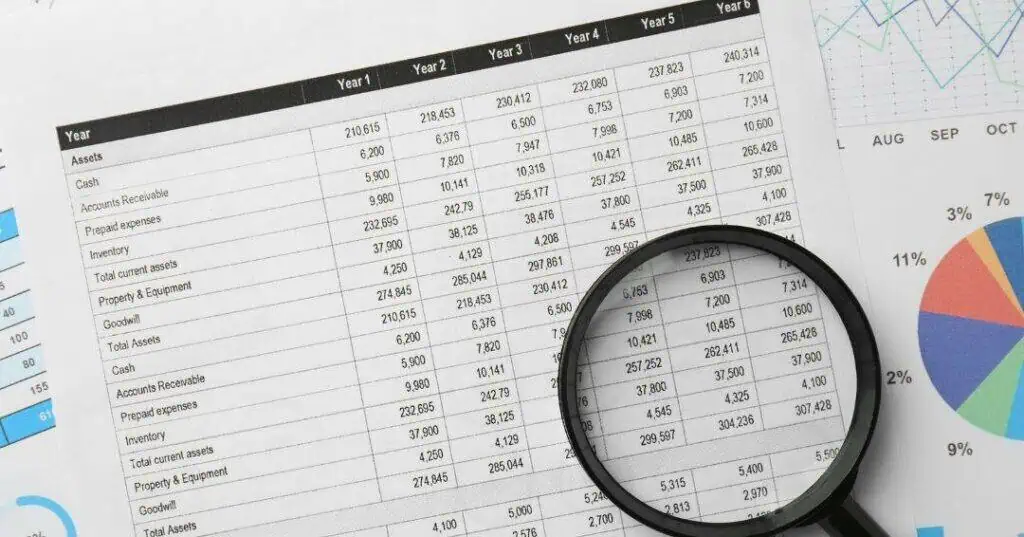
An accounts receivable aging report lists unpaid customer invoices, sorted by how long each one has been past due. Most reports group balances into buckets such as current, 1 to 30 days, 31 to 60 days, 61 to 90 days, and over 90 days. Reading the report well means looking past the totals and asking what each bucket says about the chance of getting paid.
This guide is for office managers, bursars, and business owners who can run the report but want to know what to do with it.
Key Takeaways
- An AR aging report sorts unpaid invoices into time buckets, usually in 30-day steps from current to over 90 days.
- The older a balance gets, the harder it is to collect, so the 61- to 90-day bucket is the last good window for internal follow-up.
- The month-to-month trend matters more than one snapshot, and buckets that grow every month signal a process problem.
- Many lenders give little or no value to receivables that are more than 90 days past due.
- Setting a 90-day checkpoint lets staff focus on newer balances while older accounts move into a set collection process.
- Dental, medical, and education offices read aging differently because insurance, billing cycles, and payment terms change what “late” means.
What an Accounts Receivable Aging Report Shows
An aging report pulls every open invoice from the billing system and places it in a column based on its age. Each row is usually a customer, patient, or student, and each column shows how much that person owes in each time bucket. The bottom row totals each column, giving a quick view of where the money is sitting.
QuickBooks, Dentrix, and most student billing systems can produce this report in a few clicks. The layout varies, but every version shows who owes money and how long they have owed it.
Here is a simple example for a small business with $48,000 in open receivables:
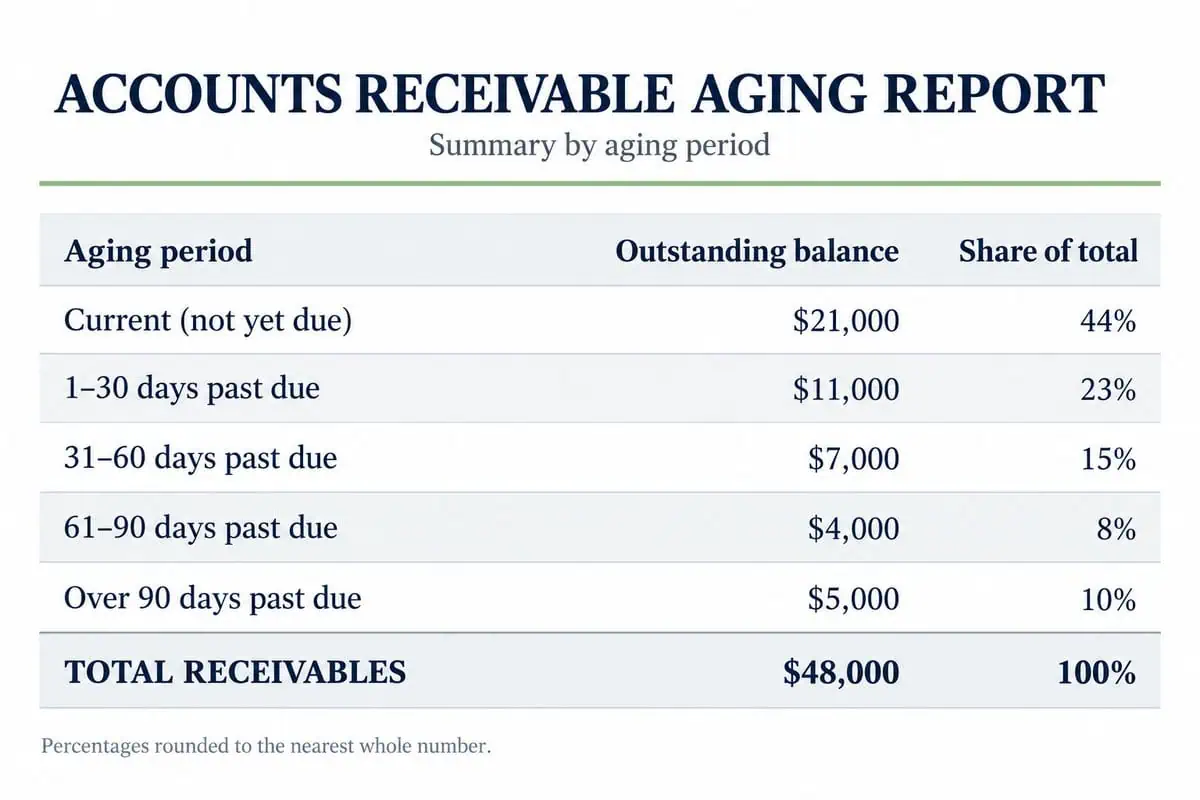
Most of this money is current or only slightly late, so the $9,000 sitting past 60 days is where attention should go first.
What Each Bucket in an Accounts Receivable Aging Report Means
Each bucket says something different about a customer’s intent and ability to pay, so reading them in order helps an office match the right follow-up to each account.
- Current: These invoices are not due yet. No action is needed beyond sending clear, accurate bills on time.
- 1 to 30 days past due: Most of these customers simply forgot or are waiting on their next pay cycle. A friendly reminder usually solves the problem.
- 31 to 60 days past due: The customer has now missed at least one reminder. This is the time for a second notice and a phone call to find out what is going on.
- 61 to 90 days past due: These balances carry real risk. The customer has ignored several contacts, and the chance of payment drops quickly.
- Over 90 days past due: These accounts have usually stopped responding to the business. Internal letters and calls rarely work at this stage, so a structured collection process is the better path.
A customer who has not paid or spoken to the business in 90 days is no longer acting like a customer. The relationship may still matter, but the account needs a different kind of attention.
The Trend Matters More Than the Snapshot
A single aging report is a photo of one moment. The real insight comes from comparing reports month to month and watching how the total in each bucket changes over time.
Track whether each bucket is growing or shrinking from one month to the next. If the 61- to 90-day and over-90-day buckets get bigger every month, that is not what accounts receivable is supposed to do. Healthy receivables move through the buckets and clear out as customers pay.
Lenders look at this too. Banks often ignore receivables older than 90 days when they count accounts receivable as an asset. In other words, the bank may treat that money as if it will never come in. If a balance is never collected, it may become a bad debt under IRS rules, a loss no business wants to plan for.
Warning Signs Hiding in an Aging Report
Some problems show up only when someone reads the report carefully. These are the patterns that deserve a closer look:
- Older buckets growing faster than total sales. This means collections are falling behind, even if the business is busy.
- The same names in the 60+ day columns every month. Repeat late payers often get slower over time, not faster.
- Small balances piling up. Many small accounts can add up to a large total that no one feels responsible for.
- Partial payments that never close the balance. A customer sending a few dollars a month can keep an account looking “active” for years.
- Accounts with no recent contact notes. If no one has reached out in weeks, the account is aging by default.
These signs usually point to a process gap rather than a customer problem, and many overlap with the warning signs a business client won’t pay.
What to Do With Accounts in Each Bucket
The aging report is most useful when each bucket has a matching action. Many offices use a simple plan like this one:
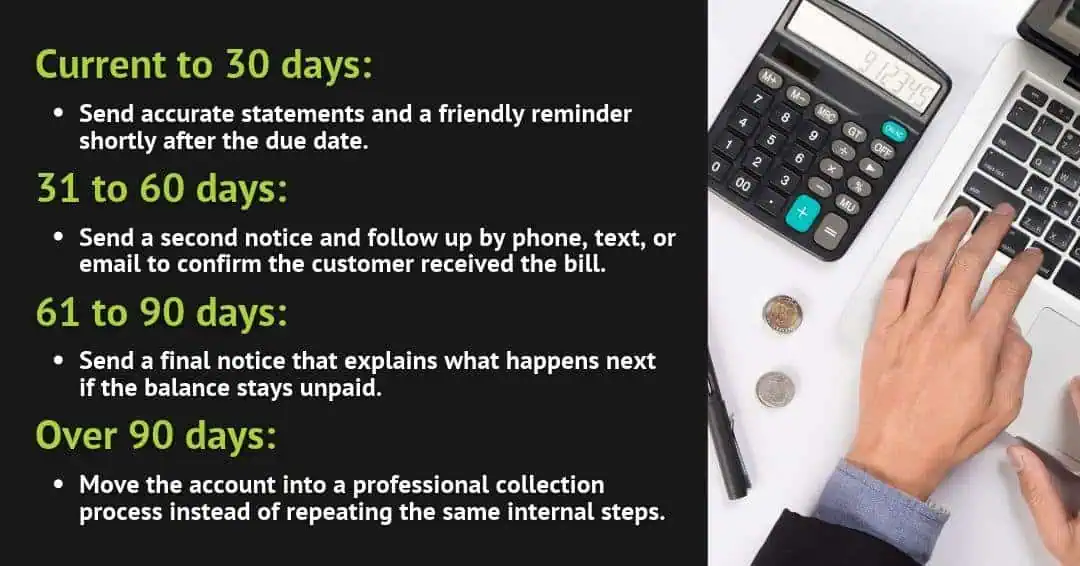
Set an AR checkpoint at 90 days. Staff gives full attention to balances that are 90 days old or newer. Anything older moves into an automated process that staff does not have to manage day to day. This lets the office manage by exception instead of watching every account at once.
This plan lines up with how Kinum works. In Phase 1, Kinum sends letters, calls, and text and email reminders in the client’s own name, which suits younger balances. In Phase 2, professional collectors take over older accounts with full reporting and no upfront cost. Offices that have never sorted out their older balances can start with a full accounts receivable cleanup and then use this bucket plan to keep things current.
How Dental, Medical, and Education Offices Read Aging Differently
The basic buckets work for any business, but each industry has its own wrinkles that change when a balance is truly late.
Dental practices often see balances age while a claim is waiting on insurance. The patient’s portion may not be billed until the insurance payment arrives, so the aging clock can start later than the visit date. Clear front-desk financial policies help keep these balances from drifting.
Medical practices face the same insurance delay, and many patients rank medical bills below rent, utilities, and car payments, so these balances slip down the list quickly.
Colleges and universities often bill by term instead of by month. A student balance may look current for weeks and then jump into an older bucket all at once after the term ends. For this reason, bursar offices often review aging around registration and graduation dates.
Commercial businesses that bill on net 30 terms can read the buckets more literally, since an invoice sent on the first with no payment by the next first is simply late.
FAQ
What does AR aging mean?
AR aging means sorting unpaid customer invoices by how long they have been past due. It shows how much money sits in each time bucket, such as 1 to 30 days or over 90 days. Businesses use AR aging to see which balances need follow-up first, identify slow-paying customers, and decide when to move an account to a collection agency.
How often should a business run an aging report?
Most businesses should run an aging report at least once a month. A monthly report makes it easy to compare buckets over time and catch accounts that are slipping into older columns. Offices with high billing volume, such as busy medical or dental practices, often review it every week. The key is to review it on a set schedule and act on what it shows.
When is an account too old to collect internally?
Most accounts become hard to collect internally after about 90 days past due. By that point, the customer has usually ignored several letters and calls from the business. Staff time spent chasing these balances often costs more than it recovers. Moving accounts older than 90 days into a professional collection process gives them a better chance of being paid.
What is the difference between an AR and an AP aging report?
An AR aging report shows money customers owe the business. An AP aging report shows money the business owes its own vendors and suppliers. Both reports use the same time buckets, but they answer different questions. AR aging helps with collections and cash flow. AP aging helps a business plan its own payments and avoid late fees.
Turning an Aging Report Into a Collections Plan
An accounts receivable aging report is only useful when it leads to action. Reading the buckets, watching the monthly trend, and setting a clear checkpoint can turn a confusing list of numbers into a simple plan for getting paid.
Businesses whose older buckets grow every month don’t have to handle those accounts alone. Kinum’s accounts receivable collection services start with friendly reminders and move to professional collections only when needed. Businesses can contact Kinum to review what their aging report shows.